DVRCMS.Com Press

Survelliance CMS and VMS Support

Discover
  • Home
  • Support
    • How To
    • Installation Guide
    • Troubleshooting
    • User Guide
  • Download
    • PC Software
    • Mobile APPS
    • Firmwares
  • General
    • DVR General
    • NVR General
    • IPC General
    • Shopping Guide
  • Contact
  • Sitemap
Home / PC Software/ IMS 4.0 Client Software User…
PC Software
Verified Article

IMS 4.0 Client Software User Manual

admin Editor
December 4, 2025 • 33 min read
IMS 4.0 Client Software User Manual
Quick Summary / Highlights
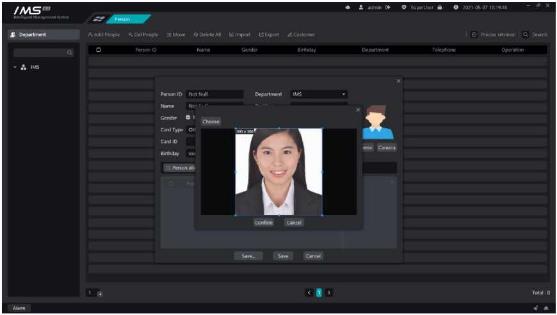
Figure 3-6 . £ Note: Must choose the front to avoid the crown, five features clear picture, invalid face picture upload server...

ims 4 0 client software user manual image19

Figure 3-6

.

£ Note:

Must choose the front to avoid the crown, five features clear picture, invalid face picture upload server will succeed, but when sent to the device will fail.

The picture must be in JPG format.

Prohibit the use of Meitu tools to process photos to prevent unrecognizable.

Try to use the ID photo as much as possible.

1.5.Edit personnel

Modify the details of the personnel in the IMS 4.0 management system.

X Operation steps:
1access to the personnel management system.
2click the button [0] at the end of the list of people to enter the editor page
3modify the information of personnel information.
4click [save and continue] or click [save].

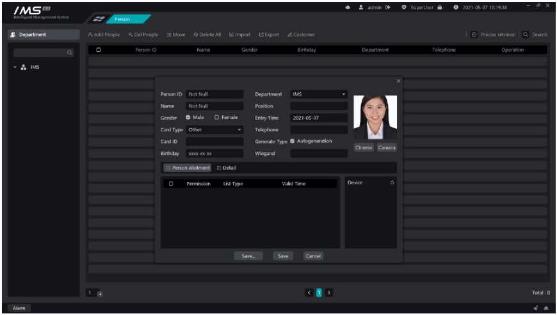
ims 4 0 client software user manual image20

Figure 3-7

.

£ Note:

Personnel number, department, name can not be empty, personnel number can not have spaces.

The person number must be a unique value.

The entry date and the date of birth must be in the format of XXXX-XX-XX.

You can’t set access control settings without setting the avatar.

1.6.Delete a person

Remove personnel information from the IMS 4.0 management system, and delete personnel operations can be divided into single deletion and bulk deletion.

1.Single deletion

X Operation steps:

1access to the personnel management system.
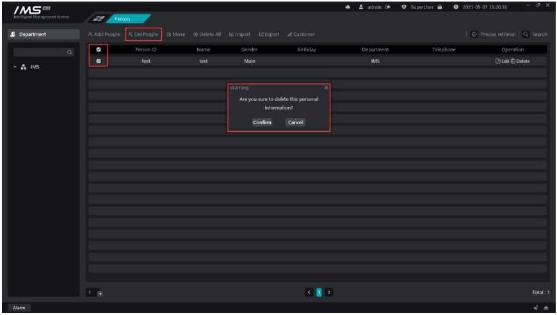
2click the button [ĞJ] at the end of the list of people to prompt for a second confirmation, as shown in figure 3-8.
3confirm deletion.
2.Batch deletion

X Operation steps:

1access to the personnel management system.
2Click the check button [ ] in each line to select the person to be deleted, which means[ ] that it has been selected. Click the check box button [ ] in the header to quickly select the person information on the current page.
3click the button [ Delete person]on the list of people button to prompt for a second confirmation, as shown in figure 3-8.
4confirm deletion.

ims 4 0 client software user manual image21

Figure 3-8

.

3.One-click delete

X Operation steps:

1access to the personnel management system.
2click the button [

Oone-click delete] above the personnel list to prompt the second confirmation, as shown in figure 3-8.

3confirm deletion.
Print Friendly, PDF & Email

Related Posts

No related posts.
Tags:
#IMS 4.0 camera connection#IMS 4.0 client configuration#IMS 4.0 client software tutorial#IMS 4.0 Client Software user manual#IMS 4.0 client troubleshooting#IMS 4.0 CMS integration#IMS 4.0 installation guide#IMS 4.0 login setup#IMS 4.0 network configuration#IMS 4.0 NVR connection#IMS 4.0 playback guide#IMS 4.0 recording setup#IMS 4.0 remote access#IMS 4.0 security settings#IMS 4.0 software download#IMS 4.0 software error#IMS 4.0 software setup#IMS 4.0 system requirements#IMS 4.0 update firmware#IMS 4.0 user management#IMS 4.0 video monitoring software
Share Article: X Facebook WhatsApp LinkedIn
Author & Editor

admin

MSAWRP Editorial Board member and senior news analyst.

All Stories
Previous Story EverFocus CMS Setup and User Guide Next Story Install Nest Cam Ultimate Guide
You May Also Like

Related Stories & Analysis

How to Monitor Solar Security Cameras on a Computer
October 19, 2026 • 8 min read

How to Monitor Solar Security Cameras on a Computer

The Best Video Surveillance Software of 2026
June 30, 2026 • 7 min read

The Best Video Surveillance Software of 2026

The Best CCTV Desktop Software of 2026: A Comprehensive Guide to AI-Driven Surveillance Solutions
February 2, 2026 • 9 min read

The Best CCTV Desktop Software of 2026: A Comprehensive Guide to AI-Driven Surveillance Solutions

Leave a Reply Cancel reply

Your email address will not be published. Required fields are marked *

About

dvrcms is a free blog attempt to provide information about security camera systems, burglar alarm and equipment, review, troubleshooting, installation, commissioning, password reset, software upgrade and new technologies.

Read Next :

dvraid– xvraid– nvripc– cctvfirmware– dvrdestek

Category

  • Home
  • Support
    • How To
    • Installation Guide
    • Troubleshooting
    • User Guide
  • Download
    • PC Software
    • Mobile APPS
    • Firmwares
  • General
    • DVR General
    • NVR General
    • IPC General
    • Shopping Guide
  • Contact
  • Sitemap

Quick Tools

Editor’s Choice

How to Monitor Solar Security Cameras on a Computer
October 19, 2026

How to Monitor Solar Security Cameras on a Computer

How to Mount a Security Camera on Any Surface
August 21, 2026

How to Mount a Security Camera on Any Surface

Verified & Unbiased Journalism
24/7 Continuous Coverage
256-Bit SSL Secure Infrastructure
Compliant with Press Code of Ethics
DVRCMS.Com

Survelliance CMS and VMS Support

Newsroom & Editorial Headquarters
haber@www.dvrcms.com

News & Current Affairs

  • Breaking News
  • Economy & Finance
  • Politics & Policy
  • World News
  • Technology & Science

Corporate

  • About Us
  • Masthead & Governance
  • Editorial Principles
  • Advertising & Partnerships
  • Contact & Inquiries

Corporate Newsletter

Get the day's top analysis and stories delivered directly to your inbox every morning.

Social Media:
© 2026 DVRCMS.Com. All rights reserved. • Developer: MSADEV
Privacy • Cookies • GDPR / KVKK • Terms of Use
Back to Top