Installation Guide PC Software User Guide
Verified Article

Qcam SmartClient Player User Guide

Quick Summary / Highlights
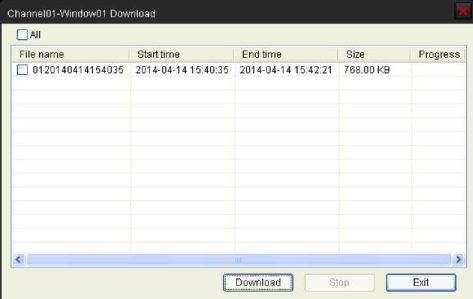
. 1.3.2 Playback Control When playback has succeeded, you can control the playback: . 1)Play / Pause. 2)Stop. 3)Single frame forward. 4)Volume...

Picture 19 473w299h

.

1.3.2 Playback Control

When playback has succeeded, you can control the playback:

Picture 20 596w42h

.

1)Play / Pause.
2)Stop.
3)Single frame forward.
4)Volume control.
5)Enable/Disable the audio.
6)Snap shot.
7)Clip the video length for  downloading.
8)Download the recording file. The default directory for the downloaded file is C:\ DownloadFile. You can modify the directory in Setup -> Local Settings page.

Author & Editor

admin

MSAWRP Editorial Board member and senior news analyst.

Leave a Reply

Your email address will not be published. Required fields are marked *